That noise isn't normal — and the heat isn't either
If your laptop sounds like it's about to take off, or it's too hot to rest on your lap, there's a very good chance the fan is clogged with dust. It's one of the most common problems we see here on the Costa Blanca — especially in summer, when temperatures are already high and the air is full of fine dust and pet hair. The good news is that it's often fixable without spending a penny, as long as you're careful.
Why dust is a bigger problem than most people realise
Your laptop's fan has one job: pull cool air in, push hot air out. When dust builds up on the vents and fan blades, airflow is restricted. The processor and other components start running hotter than they should. To protect itself, the laptop slows down automatically — this is called thermal throttling — and if the temperature keeps climbing, it'll shut itself off without warning.
Over time, sustained high heat shortens the life of your battery, your SSD, and your motherboard. A quick clean every six to twelve months can genuinely add years to a laptop's life.
Before you do anything: the golden rules
Power off completely — not sleep, not hibernate. Shut it down and unplug it from the mains.
Remove the battery if you can — on older laptops this is easy; on modern slim models the battery is usually internal, so just make sure it's unplugged.
Work on a clean, flat, well-lit surface — a kitchen table with a tea towel under the laptop is ideal.
Don't use a regular vacuum cleaner — the static it generates can damage components. We'll come to the right tools in a moment.
Never blow into the vents with your mouth — you'll introduce moisture and make things worse.
The safest method: compressed air through the vents
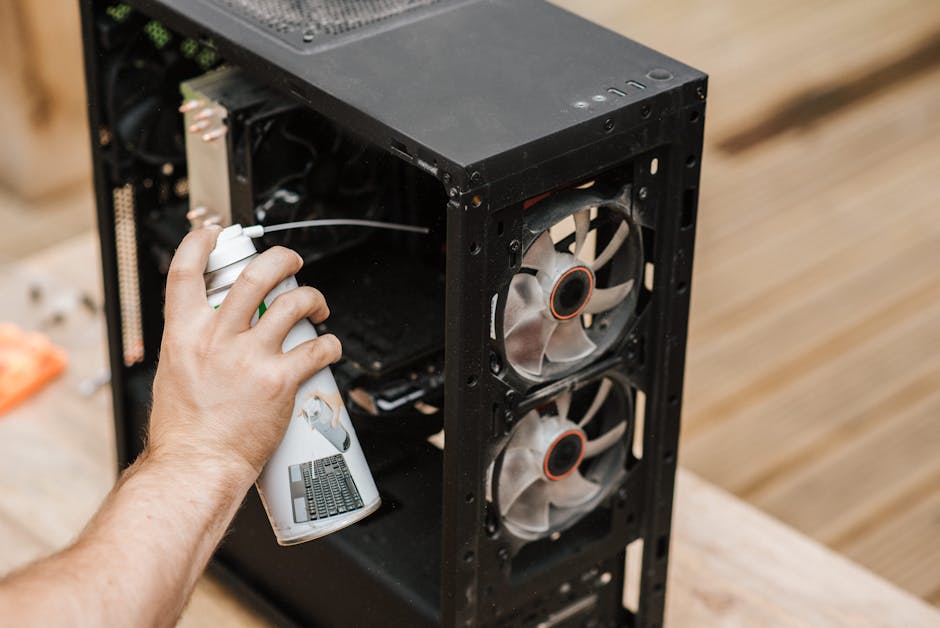
For most people, this is as far as you need to go. Buy a can of compressed air (available in most tech shops or online for a few euros). Turn the laptop upside down or on its side so you can see the exhaust vent — usually a grille on the side or rear.
Give the can a quick shake, then hold it upright (tilting it can release freezing liquid propellant onto your components).
Insert the thin straw nozzle close to — but not touching — the vent.
Blast in short one-to-two second bursts. You should see a satisfying puff of grey dust come out.
Repeat from different angles, including any intake vents on the bottom.
After a thorough blast, power the laptop back on and listen. If the fan is quieter and the machine runs cooler, you're done.
When the vent trick isn't enough: opening the case
If compressed air through the vents makes little difference, the dust build-up is likely deep inside — packed onto the fan blades and heatsink fins like felt. At this point, a proper internal clean is needed.
Opening a laptop is not complicated, but it does require the right screwdrivers (often Torx or Phillips #00), patience, and the knowledge of exactly which screws go where. On many modern laptops — especially thin Ultrabooks — the bottom panel is fragile or the battery connector must be carefully disconnected first. One snapped clip or a stripped screw and you have a bigger problem than dust.
If you're comfortable with small electronics and can find a good teardown video for your exact model, go ahead carefully. But if you're not sure, this is genuinely the point where it's worth having someone local do it properly. A professional internal clean takes about 30–45 minutes and the difference is remarkable.
It's also worth knowing that heavy overheating sometimes means the thermal paste between the processor and heatsink has dried out. Replacing it takes five minutes while the laptop is open and makes a huge difference to temperatures. See our post on 5 warning signs your laptop needs a repair for other symptoms to watch out for.
Quick comparison: DIY vent clean vs. professional internal clean
Method
Tools needed
Risk level
Best for
Compressed air through vents
Compressed air can (~€5)
Very low
Regular maintenance, light dust
Full internal clean (DIY)
Screwdrivers, anti-static mat, patience
Medium
Confident DIYers with correct tools
Professional internal clean
Bring it in
None to you
Most users, heavy dust, older machines
How often should you clean it?
Every six to twelve months is a sensible routine for most laptops. If you have pets, live near a dusty road, or use the laptop on soft surfaces like a sofa (which blocks the vents and pulls in fibres), lean towards every six months. If the laptop lives on a clean desk and barely moves, once a year is fine.
A word about MacBooks
Apple laptops get dusty too, but they're assembled with finer tolerances and proprietary screws. If your MacBook is running hot and the fan is loud, the same logic applies — but we'd strongly recommend a professional clean rather than DIY. Have a read of our guide on what actually helps when your Mac is running slow for related advice.
FAQ
Can I use a normal vacuum cleaner to remove dust from my laptop?
It's best avoided. Household vacuum cleaners generate static electricity which can damage sensitive components on the motherboard. Use compressed air instead — it's cheap, safe, and widely available.
My laptop fan is constantly running at full speed. Is that a dust problem?
Often, yes — a dust-clogged fan has to spin faster to try to move the same amount of air. But it can also be caused by a demanding background process hogging the CPU. Clean the fan first, then check your Task Manager if the noise continues.
How do I know if my laptop is overheating?
Key signs are: the bottom of the laptop is uncomfortably hot, the fan is loud and constant, the machine slows down under light tasks, or it shuts off unexpectedly. Free tools like HWMonitor (Windows) or iStatMenus (Mac) show you the actual temperature readings.
Is it worth cleaning an old laptop, or should I just replace it?
A clean and fresh thermal paste can give an older laptop a new lease of life — we regularly see machines go from barely usable to perfectly smooth after a service. If the hardware itself is obsolete, that's a different conversation, but heat problems alone are not a reason to replace a laptop.
Ese ruido no es normal — ni ese calor tampoco
Si tu portátil suena como si fuera a despegar, o quema tanto que no puedes tenerlo en las piernas, lo más probable es que el ventilador esté obstruido por polvo. Es uno de los problemas más habituales que vemos en la Costa Blanca, sobre todo en verano, cuando las temperaturas ya son altas de por sí y el ambiente está cargado de polvo fino y pelo de mascotas. La buena noticia es que muchas veces tiene solución sin gastar apenas nada, siempre que se haga con cuidado.
Por qué el polvo es más peligroso de lo que parece
El ventilador de un portátil tiene una misión: meter aire frío y sacar aire caliente. Cuando el polvo se acumula en las rejillas y en las aspas del ventilador, la circulación de aire queda bloqueada. El procesador y el resto de componentes empiezan a trabajar a temperaturas más altas de las que deberían. Para protegerse, el portátil reduce su rendimiento de forma automática — esto se llama thermal throttling en el sector — y si la temperatura sigue subiendo, se apaga sin previo aviso.
A largo plazo, el calor sostenido acorta la vida de la batería, del SSD y de la placa base. Una limpieza cada seis o doce meses puede alargar la vida útil de un portátil varios años.
Antes de empezar: las reglas básicas
Apaga el portátil del todo — no lo dejes en suspensión ni en hibernación. Apágalo completamente y desenchúfalo.
Extrae la batería si es posible — en portátiles antiguos es fácil; en los modelos finos modernos la batería suele ser interna, así que asegúrate al menos de que está desenchufado de la corriente.
Trabaja sobre una superficie limpia, plana y bien iluminada — una mesa de cocina con un trapo bajo el portátil va perfecto.
No uses un aspirador doméstico — la electricidad estática que genera puede dañar los componentes. Enseguida te contamos qué usar.
No soples por las rejillas con la boca — introduces humedad y el problema empeora.
El método más seguro: aire comprimido por las rejillas
Para la mayoría de personas, con esto es suficiente. Compra un bote de aire comprimido (lo encontrarás en cualquier tienda de informática o en Amazon por pocos euros). Pon el portátil boca abajo o de lado para ver bien la rejilla de salida de aire — normalmente es una ranura en el lateral o en la parte trasera.
Agita un poco el bote y mantenlo en posición vertical (si lo inclinas puede salir el propelente líquido y helar los componentes).
Acerca la boquilla a la rejilla sin tocarla.
Da ráfagas cortas de uno o dos segundos. Deberías ver salir una nube de polvo gris.
Repite desde distintos ángulos, incluyendo las rejillas de entrada de la parte inferior.
Enciende el portátil y escucha. Si el ventilador suena más silencioso y el equipo no quema tanto, el problema está resuelto.
Cuando el aire comprimido no es suficiente: abrir la carcasa
Si después de usar el aire comprimido el resultado apenas cambia, es probable que el polvo esté muy incrustado dentro — apelmazado sobre las aspas del ventilador y el disipador como si fuera fieltro. En ese caso hace falta una limpieza interna en profundidad.
Abrir un portátil no es complicado en sí, pero requiere los destornilladores adecuados (normalmente Torx o Phillips #00), paciencia y saber exactamente qué tornillo va dónde. En muchos modelos modernos — especialmente los ultrabooks finos — la tapa inferior es muy frágil o hay que desconectar primero el conector de la batería con mucho cuidado. Un clip roto o un tornillo pasado de rosca y tendrás un problema mayor que el polvo.
Si tienes experiencia con electrónica pequeña y encuentras un vídeo de desmontaje para tu modelo exacto, adelante con cuidado. Pero si no estás seguro, este es el momento en que merece la pena que alguien de confianza lo haga bien. Una limpieza interna profesional lleva entre 30 y 45 minutos, y la diferencia es notable.
También conviene saber que el sobrecalentamiento intenso a veces significa que la pasta térmica entre el procesador y el disipador se ha secado. Renovarla lleva cinco minutos con el portátil abierto y baja las temperaturas de forma considerable. Echa un vistazo a nuestro artículo sobre 5 señales de que tu portátil necesita reparación para detectar otros síntomas.
Comparativa rápida: limpieza casera vs. limpieza profesional interna
La mayoría de usuarios, polvo intenso, equipos antiguos
¿Con qué frecuencia hay que limpiarlo?
Cada seis a doce meses es una rutina razonable para la mayoría de portátiles. Si tienes mascotas, vives cerca de una carretera con polvo o usas el portátil sobre superficies blandas como el sofá (que bloquean las rejillas y absorben fibras), hazlo cada seis meses. Si el portátil está siempre sobre una mesa limpia y casi no se mueve, una vez al año es suficiente.
Una nota sobre los MacBook
Los portátiles de Apple también acumulan polvo, pero están ensamblados con tolerancias más ajustadas y tornillos propietarios. Si tu MacBook calienta mucho y el ventilador está disparado, la lógica es la misma — pero recomendamos encarecidamente una limpieza profesional en lugar de hacerlo uno mismo. Lee nuestra guía sobre qué funciona de verdad cuando el Mac va lento para más información relacionada.
Preguntas frecuentes
¿Puedo usar un aspirador normal para quitar el polvo del portátil?
Es mejor evitarlo. Los aspiradores domésticos generan electricidad estática que puede dañar los componentes de la placa base. Usa aire comprimido: es barato, seguro y fácil de encontrar.
El ventilador de mi portátil está siempre a máxima velocidad. ¿Es problema del polvo?
En muchos casos, sí — un ventilador obstruido por polvo tiene que girar más deprisa para mover la misma cantidad de aire. Pero también puede deberse a un proceso en segundo plano que esté consumiendo mucha CPU. Limpia primero el ventilador y, si el ruido continúa, revisa el Administrador de tareas.
¿Cómo sé si mi portátil se está sobrecalentando?
Las señales más claras son: la parte inferior del portátil quema al tacto, el ventilador suena fuerte y constante, el equipo va lento con tareas sencillas, o se apaga solo sin previo aviso. Herramientas gratuitas como HWMonitor (Windows) o iStatMenus (Mac) te muestran las temperaturas reales en tiempo real.
¿Merece la pena limpiar un portátil viejo o es mejor comprarse uno nuevo?
Una limpieza a fondo y una pasta térmica nueva pueden devolverle la vida a un portátil antiguo — con frecuencia vemos equipos que pasan de ir a trancas y barrancas a funcionar perfectamente tras una revisión. Si el hardware está completamente obsoleto, es otra conversación, pero los problemas de calor solos no son motivo para cambiar de portátil.
Computer trouble on the Costa Blanca?
30+ years of repair experience — on-site within 30 km and remote worldwide. Tell me what's wrong and I'll sort it.