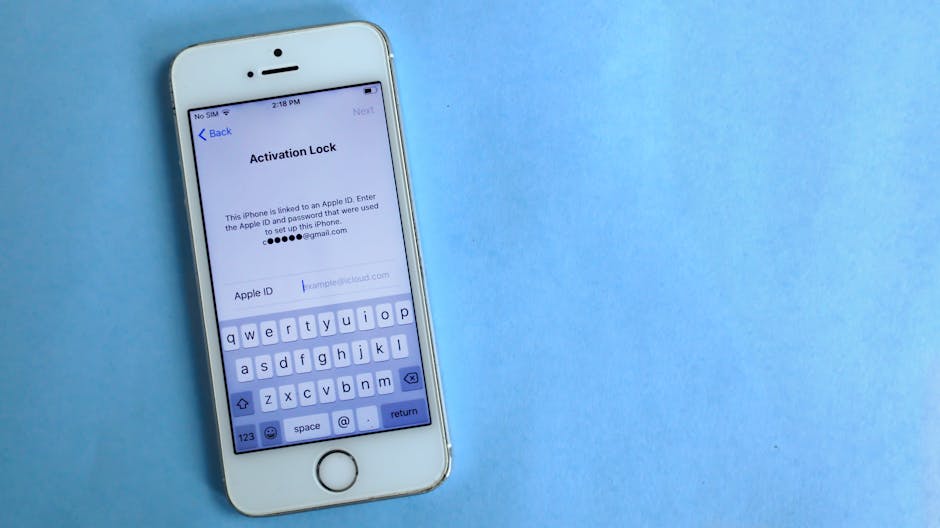
You get an email saying your Apple ID was used to sign in from a city you've never visited. Or your iPhone asks you to verify a device you don't recognise. That queasy feeling is your gut telling you something is wrong — and it's right to listen. Your Apple ID is the master key to your photos, messages, iCloud backups, and any payment cards you have stored. If someone else has it, they have a lot.
The good news: Apple gives you real tools to deal with this. The key is moving quickly and methodically.
Signs your Apple ID has been compromised
An email or text about a sign-in you didn't make. Apple sends alerts when a new device logs in. Don't ignore these.
Unfamiliar devices in your account. Any device you don't own showing up under your Apple ID is a red flag.
Purchases you didn't make appearing in your App Store or iTunes purchase history.
Your password suddenly stops working — a sign someone has already changed it.
Two-factor authentication codes arriving uninvited. If you're receiving verification codes you didn't request, someone is trying to get in.
Friends say they received odd messages from you — your Apple Messages or iCloud email may have been used.
Step 1 — Check which devices are signed in right now
On your iPhone or iPad: go to Settings → [your name] and scroll down. You'll see every device currently signed in to your Apple ID. On a Mac, go to Apple menu → System Settings → [your name]. On the web, visit appleid.apple.com.
Tap any device you don't recognise and choose Remove from Account. Do this before you change your password — otherwise the intruder gets an alert and may act faster than you.
Step 2 — Change your Apple ID password immediately
Go to Settings → [your name] → Sign-In & Security → Change Password. Use a strong, unique password — not one you use anywhere else. A 14-character mix of letters, numbers, and symbols is ideal. Don't use your name, birthday, or anything obvious.
Changing your password signs out all devices automatically (except the one you're using). That's exactly what you want.
Step 3 — Turn on two-factor authentication if it isn't on already
Two-factor authentication (2FA) means that even if someone has your password, they still can't sign in without a six-digit code sent to one of your devices. It's the single most effective thing you can do to protect your Apple ID.
Go to Settings → [your name] → Sign-In & Security → Two-Factor Authentication and switch it on. You'll need to confirm a trusted phone number. Do it now if you haven't already.
Step 4 — Check for damage
Once you've secured the account, look for what the intruder may have done:
Check your App Store purchase history for unauthorised charges. Report them to Apple immediately via reportaproblem.apple.com.
Review your iCloud Photos and Notes — were they accessed or deleted?
Check iCloud Mail sent items if you use it.
Look at Find My — did anyone see your location history?
How did they get in? Common causes
Phishing emails that looked like they came from Apple but didn't.
Reused passwords — if your email password leaked in a data breach, attackers try the same combination on Apple ID.
Someone you know — unfortunately, family disputes and relationship breakdowns are a very common reason people find themselves locked out of, or spied on through, their own Apple account.
If your Apple ID password has already been changed by the intruder and you're locked out, the recovery process is more involved. Apple's account recovery can take days, and it requires you to prove your identity carefully — which is actually reassuring, because it protects you from the same attack.
If you're locked out, or if you suspect a device in your home has been set up to monitor you, don't try to handle it alone. Bring the device in — or read our guide on other signs your device may be compromised — and we'll work through it with you confidentially. We're based in Pinar de Campoverde and help residents across Pilar de la Horadada and the wider Costa Blanca.
Quick summary: what to do right now
Check which devices are signed in — remove any you don't recognise.
Change your Apple ID password immediately.
Turn on two-factor authentication.
Check your purchase history and report any unauthorised charges.
If you're already locked out — get help promptly.
FAQ
How do I see what devices are signed in to my Apple ID?
On iPhone or iPad, go to Settings and tap your name at the top. Scroll down and you'll see a list of every device using your Apple ID. On a Mac, go to Apple menu → System Settings → your name. You can remove any device you don't recognise directly from that screen.
Someone changed my Apple ID password and I'm locked out — what do I do?
Go to iforgot.apple.com and start Apple's account recovery process. You'll need access to your trusted phone number or a recovery key if you set one up. If you don't have either, Apple's account recovery can help but takes time to verify your identity. Come and see us if you need help working through it.
Will changing my Apple ID password sign out all my other devices?
Yes — changing your Apple ID password automatically signs out every device except the one you used to make the change. That's one of the most effective ways to immediately kick out an unauthorised user.
Can someone spy on me through my Apple ID without me knowing?
If someone is signed in to your Apple ID, they can potentially see your iCloud Photos, location via Find My, messages synced to iCloud, and more. Following the steps in this post — especially removing unknown devices and changing your password — will stop that access.
Esa sensación de que algo no va bien
Te llega un correo diciendo que tu Apple ID se ha usado para iniciar sesión desde una ciudad en la que nunca has estado. O tu iPhone te pide que verifiques un dispositivo que no reconoces. Esa incomodidad que sientes tiene sentido: tu Apple ID es la llave maestra de tus fotos, mensajes, copias de seguridad en iCloud y las tarjetas de pago que tengas guardadas. Si alguien más la tiene, tiene mucho.
La buena noticia es que Apple te da herramientas reales para actuar. Lo importante es moverse rápido y con orden.
Señales de que tu Apple ID está comprometido
Un correo o SMS sobre un inicio de sesión que no has hecho tú. Apple avisa cada vez que un nuevo dispositivo accede a tu cuenta. No ignores esos mensajes.
Dispositivos desconocidos en tu cuenta. Si aparece un dispositivo que no es tuyo vinculado a tu Apple ID, es una señal de alarma clara.
Compras que tú no has hecho en el historial de App Store o iTunes.
Tu contraseña ha dejado de funcionar de repente — alguien ya la ha cambiado.
Te llegan códigos de verificación que no has solicitado. Si recibes códigos de autenticación sin haberlos pedido, alguien está intentando entrar.
Contactos tuyos te dicen que les han llegado mensajes raros de tu parte — puede que alguien esté usando tu correo de iCloud o tu Apple Messages.
Paso 1 — Comprueba qué dispositivos están conectados ahora mismo
En tu iPhone o iPad: ve a Ajustes → [tu nombre] y desplázate hacia abajo. Verás todos los dispositivos que tienen la sesión iniciada con tu Apple ID. En un Mac, ve a Menú Apple → Configuración del Sistema → [tu nombre]. Desde el navegador, entra en appleid.apple.com.
Pulsa sobre cualquier dispositivo que no reconozcas y elige Eliminar de la cuenta. Haz esto antes de cambiar la contraseña — si cambias la contraseña primero, el intruso recibe un aviso y puede reaccionar más rápido que tú.
Paso 2 — Cambia tu contraseña de Apple ID ahora mismo
Ve a Ajustes → [tu nombre] → Inicio de sesión y seguridad → Cambiar contraseña. Usa una contraseña fuerte y única, que no uses en ningún otro sitio. Una combinación de al menos 14 caracteres con letras, números y símbolos es lo ideal. Nada de tu nombre, fecha de nacimiento ni nada predecible.
Al cambiar la contraseña se cierra la sesión en todos los dispositivos automáticamente (excepto el que estás usando). Eso es exactamente lo que buscas.
Paso 3 — Activa la autenticación en dos pasos si aún no la tienes
La autenticación en dos pasos (o two-factor authentication) significa que aunque alguien tenga tu contraseña, no puede iniciar sesión sin un código de seis dígitos que llega a uno de tus dispositivos. Es la medida más eficaz que puedes tomar para proteger tu Apple ID.
Ve a Ajustes → [tu nombre] → Inicio de sesión y seguridad → Autenticación en dos pasos y actívala. Tendrás que confirmar un número de teléfono de confianza. Si aún no la tienes activada, hazlo ahora mismo.
Paso 4 — Revisa qué daño puede haberse hecho
Una vez asegurada la cuenta, comprueba qué pudo haber hecho el intruso:
Revisa el historial de compras de la App Store por cargos no autorizados. Repórtalos a Apple en reportaproblem.apple.com.
Mira tus Fotos de iCloud y Notas — ¿se ha accedido a ellas o se ha borrado algo?
Revisa los elementos enviados de tu correo de iCloud si lo usas.
Comprueba Buscar (Find My) — ¿alguien ha podido ver tu historial de ubicación?
¿Cómo han conseguido entrar? Causas habituales
Correos de phishing que parecían ser de Apple pero no lo eran.
Contraseñas reutilizadas — si la contraseña de tu correo se filtró en una brecha de datos, los atacantes prueban la misma combinación en Apple ID.
Alguien de tu entorno — lamentablemente, los conflictos familiares o de pareja son una causa muy habitual de que alguien acceda o espíe a través de la cuenta Apple de otra persona.
Wi-Fi público — conectarse en redes abiertas conlleva riesgos. Consulta nuestro artículo sobre cómo mantener tu Mac seguro y en buen estado para más consejos sobre navegación segura.
Cuándo pedir ayuda
Si el intruso ya ha cambiado tu contraseña de Apple ID y estás bloqueado, el proceso de recuperación es más complejo. La recuperación de cuenta de Apple puede tardar varios días y requiere que demuestres tu identidad — algo que en realidad es una protección a tu favor, porque también evita que el atacante use ese mismo proceso.
Si estás bloqueado, o sospechas que algún dispositivo de tu casa está siendo usado para vigilarte, no intentes resolverlo solo. Tráenos el dispositivo o consulta nuestra guía sobre otras señales de que tu dispositivo puede estar comprometido — lo tratamos contigo con total confidencialidad. Estamos en Pinar de Campoverde y atendemos a clientes de Pilar de la Horadada y toda la Costa Blanca.
Resumen rápido: qué hacer ahora mismo
Comprueba qué dispositivos tienen la sesión iniciada — elimina los que no reconozcas.
Cambia tu contraseña de Apple ID de inmediato.
Activa la autenticación en dos pasos.
Revisa el historial de compras y reporta cualquier cargo no autorizado.
Si ya estás bloqueado — busca ayuda cuanto antes.
Preguntas frecuentes
¿Cómo veo qué dispositivos tienen la sesión iniciada en mi Apple ID?
En iPhone o iPad, ve a Ajustes y pulsa tu nombre en la parte superior. Al desplazarte hacia abajo verás todos los dispositivos vinculados a tu Apple ID. En un Mac, ve a Menú Apple → Configuración del Sistema → tu nombre. Puedes eliminar cualquier dispositivo desconocido directamente desde esa pantalla.
Alguien ha cambiado mi contraseña de Apple ID y estoy bloqueado — ¿qué hago?
Entra en iforgot.apple.com e inicia el proceso de recuperación de cuenta de Apple. Necesitarás acceso a tu número de teléfono de confianza o a una clave de recuperación si la configuraste. Si no tienes ninguna de las dos, la recuperación de cuenta de Apple puede ayudarte, aunque llevará tiempo para verificar tu identidad. Pásate por nuestro taller si necesitas ayuda con el proceso.
¿Cambiar la contraseña de Apple ID cierra la sesión en todos mis dispositivos?
Sí — al cambiar la contraseña de Apple ID se cierra la sesión automáticamente en todos los dispositivos, excepto en el que has realizado el cambio. Es una de las formas más efectivas de echar de inmediato a cualquier usuario no autorizado.
¿Puede alguien espiarme a través de mi Apple ID sin que me dé cuenta?
Si alguien tiene la sesión iniciada con tu Apple ID, puede ver tus Fotos de iCloud, tu ubicación mediante Buscar (Find My), los mensajes sincronizados con iCloud y más. Siguiendo los pasos de este artículo — especialmente eliminar dispositivos desconocidos y cambiar la contraseña — se corta ese acceso.
Computer trouble on the Costa Blanca?
30+ years of repair experience — on-site within 30 km and remote worldwide. Tell me what's wrong and I'll sort it.